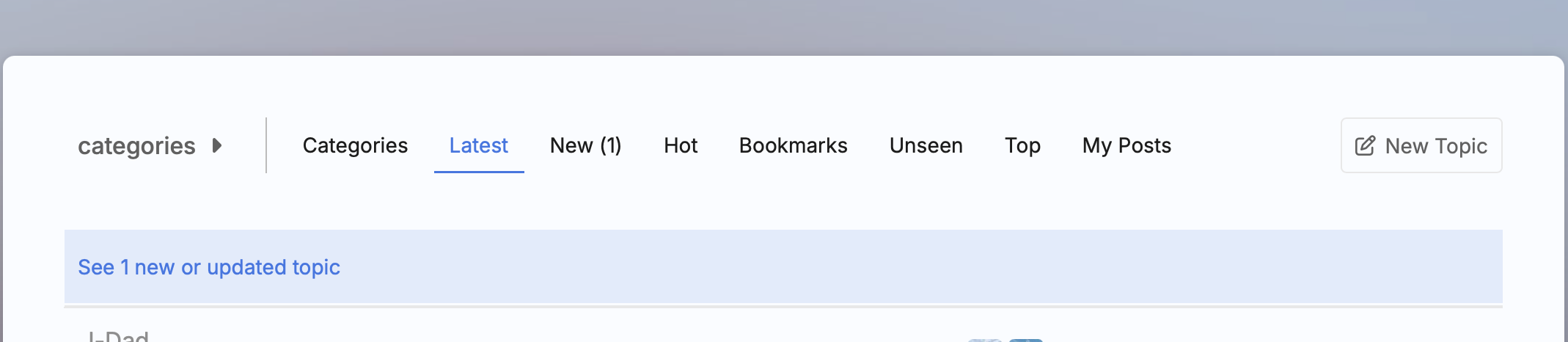
Still getting used to the new format. Can someone explain the difference between Latest, New, and Unread? I think I know but when I think I got it, I see stuff that makes me question my understanding of it. Thanks!
@rovster -some day we’re going to meet and I’m going to buy you a beer. This is about the 15th time you’ve posted a question that I was trying to work through myself.
I’ve been scratching my head over this too. What I HAVE figured out is that:
- New - you’ve never read or responded to the thread at all
- Unread - of the threads you’ve responded to, these have posts you haven’t read
- Latest - I assumed these are the latest threads with responses, whether or not you’ve responded to them . . .but that doesn’t seem to be the case.
2 Likes
LOL I’ll gladly accept the offer! As they say there no such thing as a stupid question.
That’s kind of how I understand it but for some reason with all the overlap it get’s confusing. Currently using all 3 wish there was a way to filter them. It’s a little busy for my ADD.
Maybe this is something that can be refined over time. I know this place is new and I really appreciate all the effort that has gone into making it and I don’t want to sound like I’m complaining about anything but for some reason I’m having trouble “getting it”. It’s also possible I’m dumber than I think I am🤣
1 Like
 Latest
Definition:
Shows all topics ordered by their most recent activity—replies, edits, likes, etc.
How it works:
- Displays the freshest activity across all categories you have access to.
- Includes both topics you’ve read and unread ones.
- Stickied topics (if any) are usually pinned to the top.
Use case:
Good for getting a broad snapshot of everything happening right now across the forum.
 Unread (1)
Definition:
Shows topics that have new replies in discussions you’re either:
- Tracking
- Watching
- Participated in
…and haven’t caught up on yet.
How it works:
- The number in parentheses (e.g., Unread (1)) indicates how many tracked topics have new activity.
- A topic appears here only if:
- You previously opened it
- You’re tracking or watching it (automatically or manually)
- Once you read all new replies in a topic, it disappears from this view.
Use case:
Ideal for continuing conversations you’re invested in—like replies to your posts or threads you’ve bookmarked or followed.
 Hot
Hot
Definition:
Displays topics that are currently trending, based on multiple activity signals.
How it works:
- “Hotness” is calculated by a combination of:
- Number of replies
- Speed and frequency of replies
- Likes, bookmarks, and views
- How recently it was created
- Some forums might call this Top, Trending, or have a custom “Hot” tab enabled via plugins.
Use case:
Great for surfacing buzzy, high-engagement topics even if you’re not tracking or watching them.
 Bookmarks
Definition:
Shows all the topics (or even individual posts) you’ve explicitly bookmarked.
How it works:
- You can bookmark any post by clicking the bookmark icon.
- Optionally, you can set reminders or notes for each bookmark.
- These remain listed here until you remove them manually.
- Bookmarks are private to your account.
Use case:
Use this to organize important references, follow up on threads, or save something for later.
3 Likes
Left out “New”. What’s the official
Definition of that one?
1 Like
Sorry, correct I did… DOH!
 New
New
Definition:
New topics are ones you haven’t opened yet and were created recently—since your last visit or in a user-defined time window.
How it works:
- By default, a topic appears in the New tab if:
- It was created in the last two days or
- You haven’t opened it before and it’s within the time window you set under
User Preferences → Tracking.
- This tab filters out all previously viewed topics.
Use case:
Perfect for staying on top of brand-new discussions that you might want to jump into early.
1 Like
@rovster I’ve been trying to understand it myself..lol
1 Like
I’m totally confused 
3 Likes
You’re not the only one trying to figure out new format. (Not a complaint at all, I’m more than tickled every time I log in that a bunch of like minded folks moved in short order to a format that was stood up in record time to give a new home from a site run by a bunch of Asxxoles).
4 Likes
Thanks for the feedback and absolutely ask questions! We’re all learning this together.
Imagine learning not only the UX/UI but also all the backend to stand this place up in 5 days… LOL 
I spent no joke almost 18 hours the first day – just ask my wife – reading and researching every forum software solution I could find out there. In the end with all its good points and some warts, I found this software, discourse.org, to be the best package for our community.
I knew it would be a departure from what the ol’ MS crew were use to, this was partially done on purpose but also because discourse has a massive open source community with tons of support and help. Also because it gives SkiffHQ control of what is installed, or better yet NOT installed on it.
We’ll all get use to this new UX and I know it’ll flourish and grow, not because of what we @Zika @DBStoots @Smackdaddy53 @JCDesigns did, but because of YOU!
Cheers!
6 Likes
We like it @iMacattack , just trying to figure it out! Nice work and we all appreciate the effort!
3 Likes
I think you guys are doing an outstanding job👍
3 Likes
Yeah appreciate you guys just getting used to new format that’s all.
2 Likes
This is where I am seeing inconsistencies. I have found two posts now that I never knew existed by stumbling upon them.
They did not show up in New or Hot.
One topic about “Bucket list destinations” had over 300 views and 59 replies that never showed up for me. I check New and Hot each time when I visit the site. It appeared at the bottom of another post as a related topic, but not in my New or Hot list.
So I went back to Hot to see if it was there. It was not. I had to search on “Bucket” to find it.
And I scrolled through the topics in these sections and scan - I see more of the same stuff that has less activity than that post.
There is definitely inconsistencies with how posts are showing up.
Another piece of feedback related to this - I did not want to combine this into my previous comment since they are separate, but related.
I understand Unread, although I do have an issue that if you reply, or go to reply and decide not to, it automatically puts the topic as Tracked. I change this Normal to only be notified of direct replies or mentions. I’d prefer to have a preference where I can set my default - I don’t want to track everything I respond to. Tracked by default is more like “Follow this thread” from the older site. Normal should be a choice, or the default.
1 Like
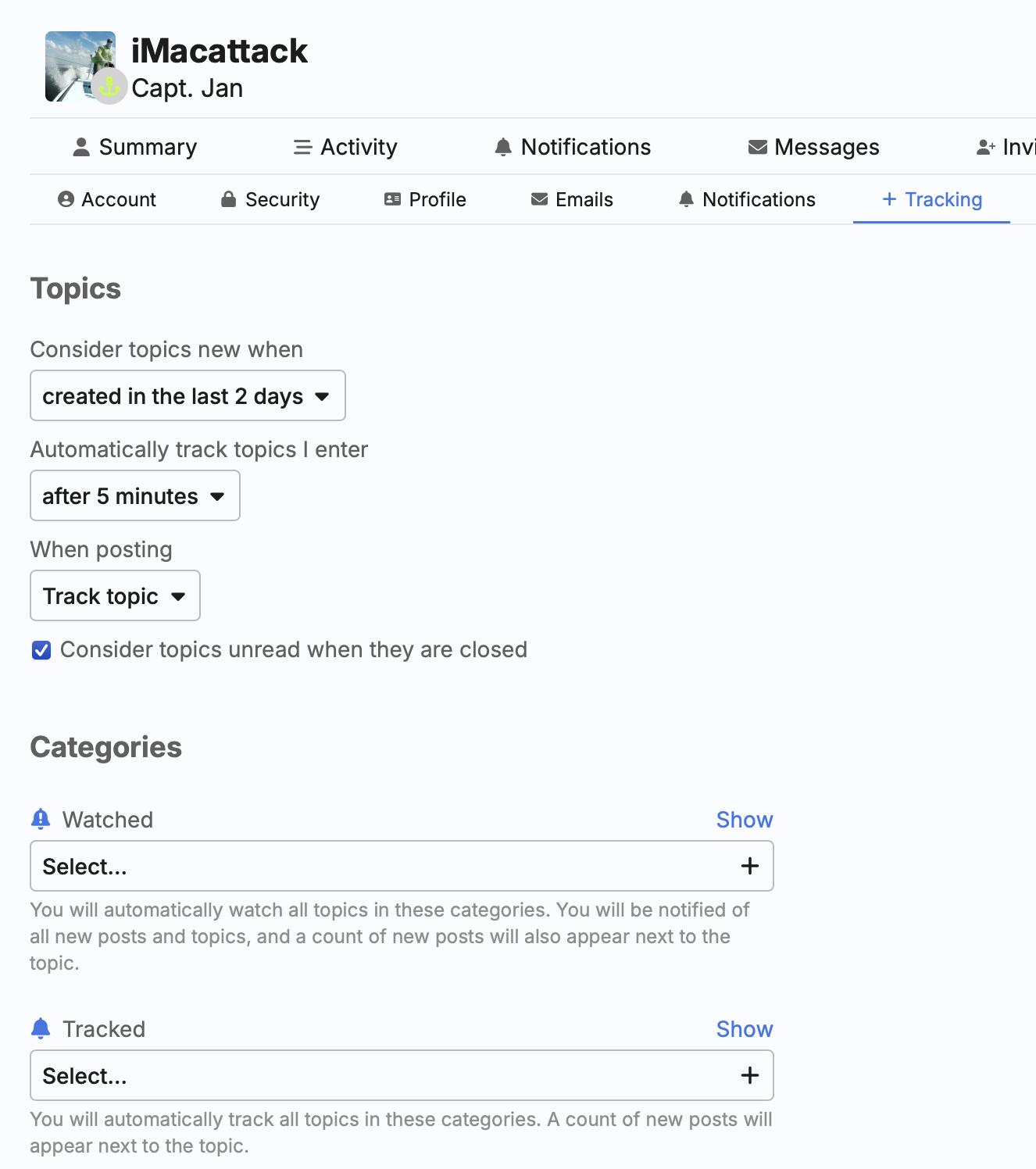
Awesome, thank you. I looked around and guess I missed it. Hopefully this post is helpful for others.
The first preference on the screenshot “Consider topics new when” could also be helpful for some people. Maybe that is how I am missing some topics pass by.
I changed this to “Created since I was here last” and see how that works.
2 Likes
Awesome, absolutely give us some feedback on if this fixes your experience! Thanks. Cheers
2 Likes